
Using Box for Storing PHI
Protecting PHI with Box Health Data Folders
Policies and Guidelines
January 18, 2023
Individuals in a covered component of the University of Illinois Covered Entity may request a Box Health Data Folder (BHDF) that is capable of securely storing protected health information. As Box is at its heart a sharing and collaboration tool, researchers using a BHDF are responsible for reading and following the guidance in the Protecting PHI with Box Health Data Folders document linked below before applying for a BHDF.
Contents
Introduction
Key points to remember
Applying for a BHDF
Folder Naming & PHI Storage Requirements
Understanding Box Folder Icons
Folder Naming Requirements
PHI Storage Requirements
Box Collaboration
Box Security Settings
Box Collaborators and Permitted Actions
Preconfigured Settings for BHDFs
Invitation Restrictions
Using Box Sync with BHDFs
Using Box Apps with BHDFs and Files
Descriptions
Tags
Email Uploads Are Prohibited
Latest version
Introduction
Recognizing the need for a secure and HIPAA compliant collaboration tool, the University of Illinois (University) has signed a Business Associate Agreement (BAA) with Box.com (Box). A BAA with Box allows Individuals to disclose (release, transfer, provide access to) Protected Health Information (PHI) to Box, an external cloud-based service, if they are otherwise not restricted from disclosing it.[1]
Box is built as a collaboration tool, with the purpose of making it easier to share data. As a result, controls are necessary to ensure it is used with PHI in compliance with HIPAA. This document outlines the Privacy Official’s required and recommended actions that members of the University community must follow to use Box.com with PHI in a compliant manner. However, it is ultimately up to those Workforce members disclosing PHI to Box and using its tools to further disclose it to collaborators to understand the technology and use it in a manner that complies with the University’s HIPAA Directive and this document.
General HIPAA training, that all Workforce Members are required to complete, is separate from the required and recommended actions contained in this document.
Key points to remember:
- Individuals must read and understand this document before applying for a “University Box Health Data Folder (BHDF)” if they wish to disclose PHI to Box.
- Individuals must apply for and be granted a BHDF from the HIPAA Privacy Official.
- If granted, BHDF “owners” must ensure that all folders (including subfolders) within Box have names that begin with “[Box Health].”
- Extreme care must be taken when inviting collaborators to BHDFs.
- Box sync for these folders is discouraged. If used, BHDFs may only be synced to university owned endpoint computers or devices that are encrypted per campus security policies and the University’s HIPAA Directive.
- Everyone who interacts with PHI within Box, including “owners,” “co-owners,” and “collaborators,” must keep it secure. Individuals that disclose PHI to Box are responsible for not only abiding by the University’s HIPAA Directive and the terms of this document, but are also accountable for making sure that any other individual with whom the PHI is shared also abides.
- Storage of PHI in a “personal” (i.e., non-BHDF) folder is strictly prohibited.
Applying for a BHDF at the University
- Only employees, volunteers, trainees, and other persons under the direct control of the University are eligible to apply for a BHDF.
- If eligible, complete the University Box Health Data Folder Request Form
- Once reviewed and approved by the HIPAA Privacy Official, you will receive notification that your application has been accepted and that the requested folder has been created within Box.
- The new BHDF will appear in your Box dashboard when you log in but is subject to the restrictions outlined in this document. You are designated the “owner” of the BHDF and ultimately responsible for access controls.
- All users of the BHDF must understand and implement the required security measures discussed below.
Folder Naming & PHI Storage Requirements
Understanding Box Folder Icons
Folders in Box appear differently based on whether they are shared or private, hosted at the University or hosted externally, owned by you or someone else, and synced or not synced. You should know the difference between the five different folder icons in Box.
Figure 1: Meaning Behind Box Folder Icon Appearances:
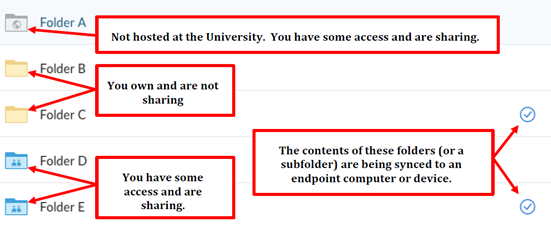
The settings behind the icon appearances will be addressed later in this document. The important feature to note about these icons is that Box does not have any folder icons that indicate the sensitivity of the data it contains. A standard Box folder (or subfolder) icon that contains PHI will look the same as a standard Box folder (or subfolder) icon that does not contain PHI.
Folder Naming Requirements
The Privacy Official has established folder naming requirements for all BHDFs and subfolders of BHDFs. These folder naming requirements do not, in and of themselves, protect folders containing PHI from being inappropriately accessed but they can help. Following these naming requirements should eliminate the necessity to access a Box folder just to determine if it contains PHI and prevent unintentional access of PHI.
All BHDFs and subfolders of BHDFs (and only BHDFs and subfolders of BHDFs) must follow these requirements, not individual filenames or Box descriptions and tags (those are additional options explained below). Both folder and file names within Box have a 255-character limit.
All BHDFs (and subfolders) must appear as follows: “[Box Health – X] foldername”
- X = “Internal” or “External” based on the collaborators involved in the project. If the project involves any collaborator external to the University, “x” will be “External.” If the project only involves employees, volunteers, trainees, and other persons under the direct control of the University, “x” will be “Internal.” “X” will be based on an individual’s initial application for a BHDF.
- foldername = the logical, consistent, and descriptive name that describes what they contain and how they relate to other files. Initially, “foldername” will be based on an individual’s initial application for a BHDF.
An example folder name for a research project might be: [Box Health – External] Jones Pancreatic Cancer Study Team
PHI Storage Requirements
The Privacy Official has established the following rules to maintain the security of PHI stored within the Box:
- PHI may only be stored in a provided BHDF. This prevents exposure or loss of the data if an individual account owner leaves the university. You will interact with this data from within your own University Box account just as you would the other Box folders that you are permitted to access.
- Do not store PHI in externally hosted folders (a disclosure that may or may not be considered a breach). Externally hosted folders can be identified by a grey Box folder icon. A Box folder icon that appears yellow or blue are folders that are internally hosted by the University. All BHDFs should appear yellow or blue (See Figure 1 Above).
Box Collaboration
Box Security Settings
Although Box itself is designed to be usable as a secure platform for collaboration, individual choices determine how secure a given piece of data within Box is. Folder “ownership” and its settings are key to the security of any data within Box. When you log into Box for everyday work, you may interact with a variety of shared and private folders for any given collaborative project, each with its own level of security set by its “owner.”
Security settings can be accessed by clicking on the ellipsis icon for the BHDF folder, then click on settings.
Box Collaborators and Permitted Actions.
As discussed in the introduction, the BAA the University has with Box allows disclosure of PHI to Box (e.g., store PHI within Box). The BAA does not, as a result, authorize disclosure of PHI within Box to any individual who has access to Box. Disclosure of PHI to another individual within Box (i.e., providing access to the PHI within Box), must independently comply with HIPAA. It is the responsibility of the “owner” or “co-owner” to disclose (i.e., provide access to) the PHI to individuals within Box in accordance with the University’s HIPAA Directive.
If disclosure of PHI to an individual is permitted by the University’s HIPAA Directive, it can be accomplished through Box by inviting the individual into the appropriate BHDF as a collaborator. However, it remains the responsibility of the “owner” or “co-owner” to always make an intentional choice about the permission level of each collaborator in a BHDF, giving each collaborator the lowest level necessary to accomplish his or her tasks.
A Box collaborator can be classified into seven different categories. Each category is permitted, or prevented, from taking certain actions (See Figure 3 Below). By default, Box collaborators are “Editors.”
- The HIPAA Privacy Official strongly recommends inviting collaborators at a level no higher than Viewer Uploader-lower as the default setting. Viewer Uploader is adequate for editing tasks but does not allow the collaborator to use sync or delete content. If you need help understanding the best set of permissions for your collaborators, consult with the Privacy Official at hipaa@uillinois.edu.
- Note: Collaborators have the same permission level in subfolders as they do in the top folder, so-called “waterfall permissions.”
Figure 2: Comparison of Collaborator Categories & Permitted Actions
Comparison of Box Collaborator Categories and Permitted Actions (The checkmark icon indicates the action is permitted.)
| Action | Collaborator Categories | |||||||
|---|---|---|---|---|---|---|---|---|
| Owner | Co-Owner | Editor | Viewer Uploader | Previewer Uploader | Viewer | Previewer | Uploader | |
| Download | permitted | permitted | permitted | permitted | Not Permitted | permitted | Not Permitted | Not Permitted |
| Comment | permitted | permitted | permitted | permitted | permitted | permitted | permitted | Not Permitted |
| Delete | permitted | permitted | permitted | Not Permitted | Not Permitted | Not Permitted | Not Permitted | Not Permitted |
| Create tasks | permitted | permitted | permitted | permitted | Not Permitted | permitted | Not Permitted | Not Permitted |
| Tag | permitted | permitted | permitted | Not Permitted | Not Permitted | Not Permitted | Not Permitted | Not Permitted |
| Invite people | permitted | permitted | Not Permitted | Not Permitted | Not Permitted | Not Permitted | Not Permitted | Not Permitted |
| Edit folder name | permitted | permitted | permitted | Not Permitted | Not Permitted | Not Permitted | Not Permitted | Not Permitted |
| Edit folder properties | permitted | permitted | Not Permitted | Not Permitted | Not Permitted | Not Permitted | Not Permitted | Not Permitted |
| Preview | permitted | permitted | permitted | permitted | permitted | permitted | permitted | Not Permitted |
| Send view-only links | permitted | permitted | permitted | permitted | Not Permitted | permitted | Not Permitted | Not Permitted |
| Upload | permitted | permitted | permitted | permitted | permitted | Not Permitted | Not Permitted | permitted |
| View items in folder | permitted | permitted | permitted | permitted | permitted | permitted | permitted | permitted |
| Sync folder | permitted | permitted | permitted | Not Permitted | Not Permitted | Not Permitted | Not Permitted | Not Permitted |
| Set access permissions | permitted | permitted | permitted | Not Permitted | Not Permitted | Not Permitted | Not Permitted | Not Permitted |
| Restrict invitations | permitted | permitted | Not Permitted | Not Permitted | Not Permitted | Not Permitted | Not Permitted | Not Permitted |
| View access stats | permitted | permitted | permitted | Not Permitted | Not Permitted | Not Permitted | Not Permitted | Not Permitted |
| Create/edit Box Notes | permitted | permitted | permitted | permitted | Not Permitted | Not Permitted | Not Permitted | Not Permitted |
| View Box Notes | permitted | permitted | permitted | permitted | permitted | permitted | permitted | Not Permitted |
Preconfigured BHDF Settings
The Privacy Official has preconfigured some collaboration settings for BHDFs. These settings, marked as number 1, 2, 3, 4 and 5 in Figure 3 below, have been set and cannot be changed.
Figure 3: Collaboration Settings Screenshot:
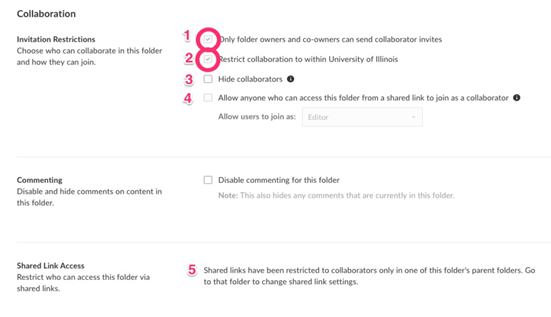
- “Only Owners and Co-owners can send collaborator invites.” This is a preconfigured setting and will appear checked in all BHDFs and cannot be changed. When checked, this setting restricts the ability to invite collaborators to only the BHDF “owner” and “co-owner.” This is the single most important setting for securing PHI within Box. Only individuals designated as “owner” or “co-owner” of the BHDF should be in full control of who can access the PHI. It is the responsibility of the “owner” or “co-owner” to disclose (i.e., provide access to) the PHI to individuals in accordance with the University’s HIPAA Directive. This includes, but is not limited to, ensuring the individual has the appropriate training to handle PHI.
- “Restrict collaboration to within the University of Illinois.” This is a preconfigured setting and will appear checked or not checked depending on an individual’s initial application for the BHDF. The setting determines whether the BHDF will allow collaborators external to the University. It is the responsibility of the “owner” or “co-owner” to disclose (i.e., provide access to) the PHI to external individuals in accordance with the University’s HIPAA Directive. This includes, but is not limited to, ensuring the University has the appropriate authorization, agreement, or IRB waiver, as necessary, to disclose PHI to the external individual(s) or their institution.
- “Hide collaborators.” This is a preconfigured setting and will appear not checked in all BHDFs. In general, the HIPAA Privacy Official does not recommend hiding collaborators as it is more secure to know exactly who has access to a Box folder. Specifically, this box may not be checked for any BHDF.
- “Allow anyone who can access this folder from a shared link to join as a collaborator.” This is a preconfigured setting and will appear not checked in all BHDFs and cannot be changed.
- “Restrict shared links in this folder to Collaborators Only.” This is a preconfigured setting and will appear checked in all BHDFs and cannot be changed. Shared links provide quick access directly to files and folders by only clicking the link. When checked, this setting restricts access to shared links to only those who already have access to the BHDF as a collaborator. This is an important access control for any folder you are trying to secure and monitor.
Using Box Sync with BHDFs
Syncing folders in Box allows data to be transferred from within Box to an endpoint computer or device without a log trail, which presents a security risk for PHI. In addition, having extra copies of data on a local device increases the risk of inappropriate access.
- Any endpoint computer or device syncing with a BHDF must be encrypted per requirements set forth in University security policies and the University’s HIPAA Directive.
- The Privacy Official strongly recommends that BHDFs not be set to sync to an endpoint computer or device unless it is absolutely necessary. Unless sync becomes necessary for a collaborator, you should prevent them from syncing folders by inviting them as a category of collaborator that does not permit that action, e.g., Viewer Uploader (See Figure 2 Above).
- Do not sync BHDFs (or any other sensitive University data) onto a personally owned computer under any circumstances.
Note: Be aware that “tags” and “descriptions,” described below, do not propagate via sync.
Using Box Apps with BHDFs and Files
The Privacy Official reminds all users of Box that only some of the official and third-party Box Applications (Apps) are approved for use with University data. Apps not listed on the approved list may not be used to share or maintain any of the University’s data, including PHI, and are not covered by the university’s Box agreement. Certain Apps are approved for use with most University data, but not approved for PHI; these may not be used with any PHI in BHDFs.
Descriptions
Any file or folder within Box can have a brief description, which will appear below the item name in the folder list view. The HIPAA Privacy Official recommends using the description field to indicate the purpose or nature of an item to collaborators.
You may see the option to add a description when creating or uploading an item. To add one to an existing file or folder in Box, in the folder view, either right-click the item, or click the ellipsis icon to the right of the item name. Choose Properties, and then General Info. Enter the description in the “Description:” field, and click Save.
Email Uploads Are Prohibited
Uploads of PHI to a BHDF must be done using the secure web interface and may not be done by email. Box does allow for email uploads but it should never be selected to upload PHI (See Figure 4 Below).
Figure 4: Uploading screenshot:

Allowing email uploads to BHDFs is strictly prohibited. If anyone (“owner,” “co-owner,” or “collaborator”) were to send sensitive data via an unencrypted email message, the data would not be protected in transit which is a violation of the University’s HIPAA Directive.
Latest version
View the most recent version of the Protecting PHI with Box Health Data Folders document.
Footnotes
[1] PHI received by a Workforce Member may be subject to restrictions on further disclosure. For example, a data use agreement to obtain the PHI may restrict further disclosure. In addition, some PHI may be subject to laws more restrictive than HIPAA that prohibit re-disclosure without further patient authorization.
